Dynavector DV501 Tone arm Instruction Manual

INDEX
Here appears the new bi-axis tone arm Dynavector DV501 designed on the same theoretical base of DV505 which are recognized and appreciate highly by their outstanding performance and thus given the Design and Engineering Award at C.E.S. Chicago 1977. And now again, DV501 has been awarded the similar prize at C.E.S. Chicago in1982 for its highly advanced technology.
- 1. Foreword
- 2. Parts illustration
- 3. Installation to turntable
- 4. Output line connection
- 5. Cartridge installation and adjustments
- 6. Specifications
1. Foreword
Thank you for choosing Dynavector products. DV501 is a specially designed tone arm which can reproduce the signal on disc without influence caused by disc warp. In order to perform its unique specifications Including bi-axis inertia separation to vertical and lateral directions, the DV501 has a more complicated structure compared to conventional tone arms.
However, it is quick and easy to set up, provided that you should read this instruction manual carefully first.
2. Parts illustration
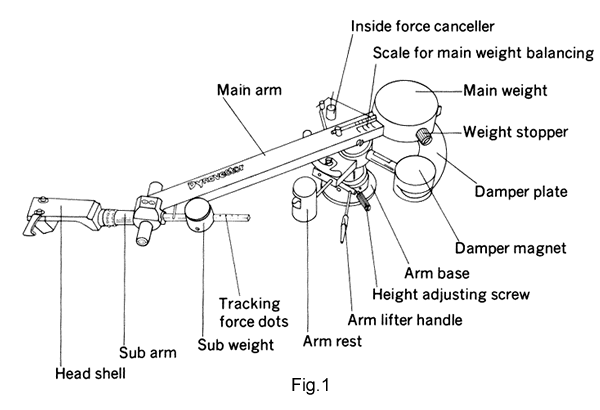
3. Installation to turntable
There are no rubbers or felt washers provided as these detract from the performance in todays modern turntables.
Please keep the DV501 in its box whilst drilling holes to avoid any damage to the arm.
For mounting the DV501 you will first require an accurately placed hole in the deck. This can easily be obtained using the enclosed paper template.
After marking the holes' center drill out to a diameter of 29 or 30mm. Test the arm in the mounting hole. Mark the position of the DV501's small fixing holes on ARM BASE, remove the arm and then make three small holes at these positions using a gimlet or sharp instrument. The arm can now be secured to the board using the screws provided.
4. Output line connection
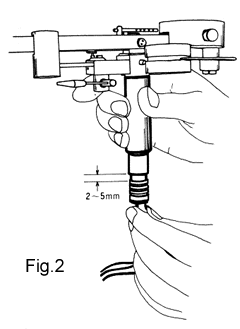
Insert the DV501's arm cable to the output terminal which is situated under the DV501.
There will be a 2-5mm allowance between the plug and outer pipe of the DV501 to enable you to use other types of arm cord you wish to do so. (See Fig. 2)
5. Cartridge installation and adjustments
Please follow these six points when installing your cartridge in the DV501.
- 1. Damper plate check
- 2. Overhang adjustment for the cartridge in headshell
- 3. Main weight balance position
- 4. Tone arm height adjusting
- 5. Tracking force setting
- 6. Bias adjustment
These checks can be carried out as follows
1. Damper plate check
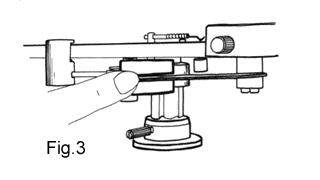
Gently rotate the Main Arm. If the Damper Plate moves freely through the Damper Magnet slit no further action is necessary. If, however, the plates' movement is restricted by touching or rubbing on the magnet you will need to gently bend the plate with your finger to avoid obstruction.
Please be careful not to over bend this delicate part of the arm, any adjustment should be minor and free running of the damper plate soon obtained. Avoid knocking or touching the plate after it has been set. Be careful not to scratch the painted surface. (see Fig. 3).
2. Cartridge mounting and overhang adjustment
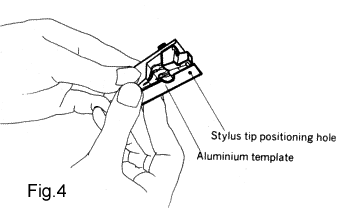
Correct adjustment for the overhang is needed to obtain good performance of cartridge.
Fix the cartridge to the headshell after adjustment for the overhang as cartridge stylus tip is exactly over the mark on the the aluminum template we supplied.
3. Main weight balance
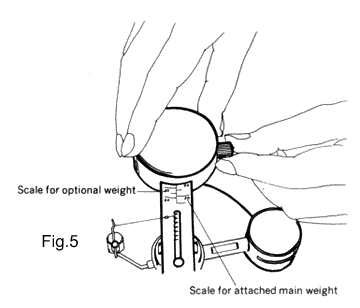
As you are aware the DV501 is in fact two arms in one. In the horizontal plane it has very heavy inertia careful balancing with the main weight is therefore required in order for the main arm to rotate smoothly.
The actual DV headshell weight of 15 grams should be added to the cartridge weight.
Slide the main weight until it fits the scale of total weight (headshell plus cartridge) printed on main arm (see rig 5).
< NOTE >If the total weight is in excess of 30grs the arm cannot balance.
Please refer to your Dynavector distributor who can supply an optional weight set for up to 40grs (weight set DV7D).
4. Tone arm height adjusting
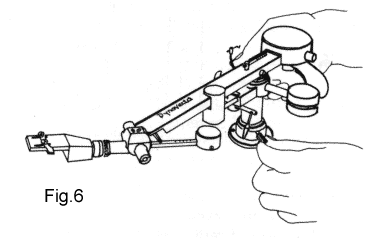
This adjustment can be made by releasing the height adjust screw as shown in Fig 6.
First set tracking force adjuster to zero point and balance sub arm precisely level by sliding sub weight to right position, Sub arm so balanced, turn adjuster finger screw to obtain necessary tracking force. Adjuster scale is graduated by 0.2grams and between graduation marks, too, adjustment is done progressively in proportion to adjuster screw advance.Height adjustment is correct when sub arm is parallel to record surface. Always hold the arm securely to avoid to fall when releasing the adjust screw.
5. Tracking force setting
< CAUTION >
The larger marks on the sub arm are for use only with optional weight set DV7D.
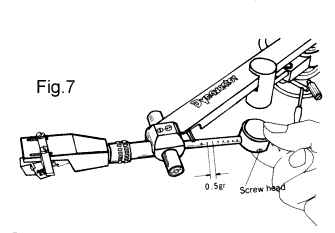
DV501 has static balance type tracking force. Insert the sub weight onto the sub arm with the weight screw facing towards you (it will not fit if the screw faces the main arm )
With the headshell and cartridge in place slide the weight along the sub arm until it balances precisely.
When this position is reached slide the weight forward by the required number of dots to obtain tracking weight. Each dot represents 0.5g of tracking force (see Fig 7).
6. Bias adjustment
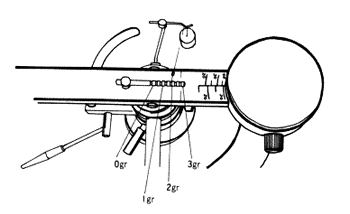
Suspend bias adjustment weight on scale bar at rear of main arm.
Position should correspond exactly with tracking force setting. Each pitch coincides with 0.5grs of tracking force (see Fig 8).
In some case due to record material or stylus shape of cartridge, you could obtain the better result to readjust the weight.
All adjustments and setting up are now completed. Your DV501 arm is designed to be maintenance free. It will give long and reliable service but should be treated with care and kept in a dust free condition.
Should the arm require an overhaul or if you need any quations or spare parts for your DV501 please contact your dealer or Dvnavector distributor.
6. Specifications
| System | Bi-axls inertia controlled dynamic and eddy current damping static balance type tone arm |
| Total length | 309mm (including headshell) |
| Effective length | 241mm |
| Overhang | 15mm |
| Offset angle | 21.5 degree |
| Height | 54mm (liftable up to 94mm) |
| Depth | 55mm (without connecting cable ) |
| Height adjustability | 36-76mm (at sub arm center) |
| Optimum cartridge weight | 15 - 30g (including headshell) |
| Tracklng force adjustability | 0 - 3g by 0.5g step |
| Lateral tracking angle error | -1.1 degree to +2.2 degree (0 degree at inner band of record disk, 2.2 degree at outside) |
| Motion sensitivity | Lateral -- less than 50 mg Vertical -- less than 20 mg |
| Net weight | 960 g |
| Output connector | 5P connector with low resistance cord 0.025 ohms/m, 50pF/m |
| Head connector | EIA standards |
| Head shell | Aluminum diced and milled (weight 15g) |
Optional devices
| DV7A arm base |
When attaching DV501 to a metal turntable arm-board, the supplied screws cannot be used. DV7A arm base enables the DV501 to be flxed to such turntables using only one hole. |
| DV7D weight set |
For use when cartridge and headshell weight is in excess of 30 g. DV7D weight set allows balance up to 40 g. |
